Chases your mouse
The cat follows your cursor and changes direction while it moves.
 Cat Companion
Download
Cat Companion
Download
Tiny cursor companion
A small Oneko-style pet that follows your mouse, idles, sleeps, scratches, and reacts while you move around.
Website-only demo. Install the app for the best Cat Companion experience.
What it does
The cat follows your cursor and changes direction while it moves.
It can stop, sleep, scratch, and pop into alert mode when you move away.
Use the Windows installer, or load the Chrome zip for browser pages.
It keeps the tiny pixel look, quick movement, and playful cat behavior.
Download
Windows app
Install Cat Companion as an app on your Windows computer.
Download Windows appChrome extension
Load Cat Companion into Chrome so it appears on normal websites.
Download extension zipChrome install
Use the download button and keep the file somewhere easy to find, like Downloads.
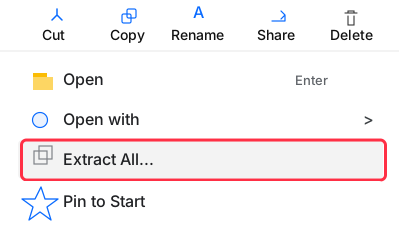
Download cat-companion-v6.zipRight-click the downloaded zip, then choose Extract All....
Paste this into Chrome's address bar:
chrome://extensions/
Turn on the Developer mode switch in the top-right of the extensions page.

Chrome will ask you to choose the extracted extension folder.

Select the extracted cat-companion-v6 folder, then refresh normal websites.
Chrome limits
Normal http:// and https:// websites after you refresh the page.
Chrome's tab bar, address bar, bookmarks bar, built-in New Tab page, chrome:// pages, or the Chrome Web Store.
Storage remembers cat position. The GitHub raw host permission fetches the pinned Oneko sprite image.
Credits
Blur AutoClicker by Blur009.
github.com/Blur009/Blur-AutoClickerVencord Oneko plugin.
github.com/Vendicated/Vencordadryd325/oneko.js pinned oneko.gif.